A ready-made screen
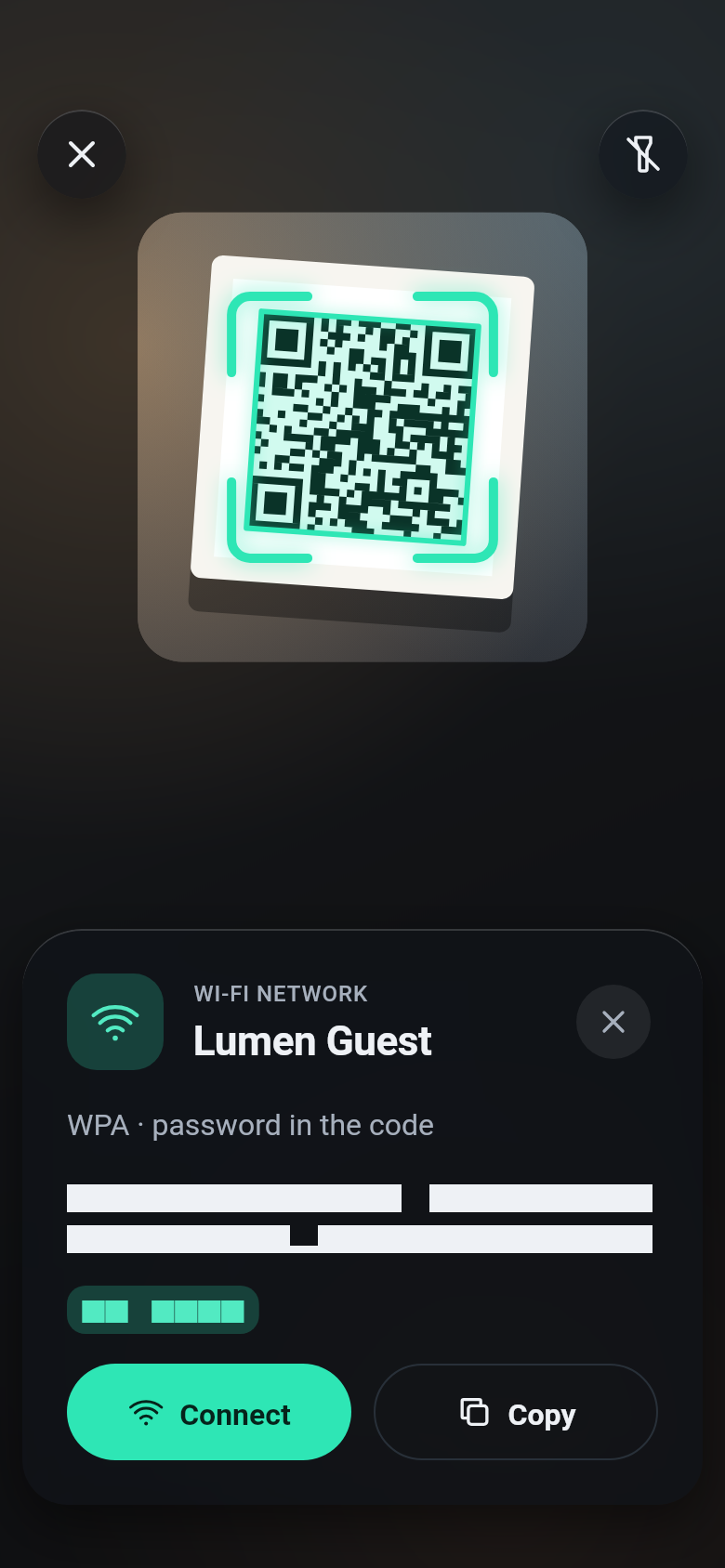
BarcodeScanner(template: ...) puts a whole screen around the camera: glass buttons (close, torch, photo, zoom, camera switch), a hint, brackets that lock onto the code, and a sheet with what the code holds and what to do with it.
BarcodeScanner(
  template: const ScannerTemplate.content(),
  onDetect: (capture) => print(capture.barcode.text),
)
Pick a template
| Template | For |
|---|---|
ScannerTemplate.minimal() | Any code, with a sheet that shows what is in it; the default of scanBarcode |
ScannerTemplate.payment() | Paying with a QR code: the window high up, your payment sheet below |
ScannerTemplate.retail() | Product and shipping barcodes in a row: dark glass, the torch, a list with counts |
ScannerTemplate.ticket() | Boarding passes, tickets and IDs (PDF417, Aztec, QR, Data Matrix), your sheet with the fields |
ScannerTemplate.content() | Everyday QR codes (links, Wi-Fi, contacts, events): dark glass, your actions such as Open or Connect |
ScannerTemplate.product() | Products and books: EAN and UPC, a sheet with the GTIN or ISBN |
ScannerTemplate.small() | Small codes on parts and boards: a small window, 2× zoom from the start |
ScannerTemplate.signIn() | Signing in or pairing with a QR code on another screen: closes with the code accepted |
ScannerTemplate.checkIn(check:) | Tickets at the door: scanning never stops, a green, amber or red verdict for each code, a counter |
ScannerTemplate.pharma() | Medicine packs: GS1 Data Matrix with the GTIN, batch, serial and expiry date, marked when expired |
ScannerTemplate.pick() | Several codes in view or on a photo: no window, a label on every code, a tap picks one |
ScannerTemplate.logistics() | Shipping labels: GS1-128 with SSCC, GTIN, quantity and batch in a list |
ScannerTemplate.kiosk() | Self-service: the front camera, no buttons, large text, verdicts that hide by themselves |
ScannerTemplate.fullscreen() | The whole camera without a window: the brackets appear on the code |
ScannerTemplate.vin() | Vehicle identification numbers on the windshield or the door pillar |
ScannerTemplate.loyalty() | Loyalty and membership cards: the card number large |
See them all in the template gallery.
What happens with a code
A template's mode decides what happens with the codes it finds:
ScannerMode | What happens |
|---|---|
single | Scanning pauses and a sheet shows the code |
collect | Codes go into a list with counts, and scanning goes on |
continuous | Each code gets a short verdict, and scanning goes on |
pick | Every code in view gets a label, and a tap picks one |
Each template has the mode it needs. copyWith changes it, and any other setting:
BarcodeScanner(
  template: const ScannerTemplate.minimal().copyWith(
    mode: ScannerMode.collect,
    onDone: () => (items) => print('${items.length} codes'),
  ),
)
A field that can be empty takes a function that returns the new value, as onDone above: () => null clears it. For title and hint, () => null gives back the template's own text; pass () => '' for none.
BarcodeScanner(
  template: ScannerTemplate.pick(
    onPick: (barcode, capture) => print(barcode.text),
  ),
)
Check each code
A check accepts, flags or refuses each code before anything else happens, such as a ticket at the door or a sign-in code of your own service. It may be asynchronous. The scanner shows the verdict in green, amber or red, with a haptic and a sound of its own for each.
final Set<String> checkedIn = {};

Widget door() => BarcodeScanner(
  template: ScannerTemplate.checkIn(
    check: (barcode) async {
      final String ticket = barcode.text;
      if (!ticket.startsWith('TICKET-')) {
        return const ScanVerdict.reject(title: 'Not a ticket');
      }
      if (!checkedIn.add(ticket)) {
        return ScanVerdict.warn(title: ticket, message: 'Already checked in');
      }
      return ScanVerdict.accept(title: ticket, message: 'Welcome');
    },
  ),
);
The result sheet
actionsBuilder sets the buttons of the result sheet. ScannerResult has the code, its capture and the default buttons:
BarcodeScanner(
  template: ScannerTemplate.content(
    actionsBuilder: (context, result) => [
      if (result.barcode.content.uri case final Uri uri)
        ScannerAction(
          label: 'Open',
          primary: true,
          onPressed: () => launchUrl(uri),
        ),
      ...result.defaultActions,
    ],
  ),
)
resultBuilder replaces the whole sheet with your own widget. With showResult: false there is no sheet: the brackets lock onto the code, the scanner pauses, and the app handles onDetect and calls controller.resume() to scan the next code.
Other settings
Every template takes these, in its constructor or in copyWith:
| Setting | What it does |
|---|---|
formats | The formats to look for |
scanWindow | The part of the preview that is decoded and its shape |
title, hint | The texts above and under the window |
facing, initialZoom | The camera to start with and its zoom |
torchButton, photoButton, zoomButtons, switchCameraButton, closeButton | Which buttons show |
onClose | What the close button does; Navigator.maybePop by default |
closeOnResult | Once a code is accepted, close the screen with the Barcode as the route's result, instead of showing a sheet |
resumeAfter | How long a result shows before scanning goes on by itself: the verdict in continuous mode (2 seconds by default), or the sheet in single mode (null waits for the user) |
counter | In continuous mode, a counter of the accepted codes at the top |
haptics, sound | A haptic and the system click when a code is found, and stronger ones for a flagged or refused code |
theme | The template's colours, over the app's ScannerScope (Colours and texts) |